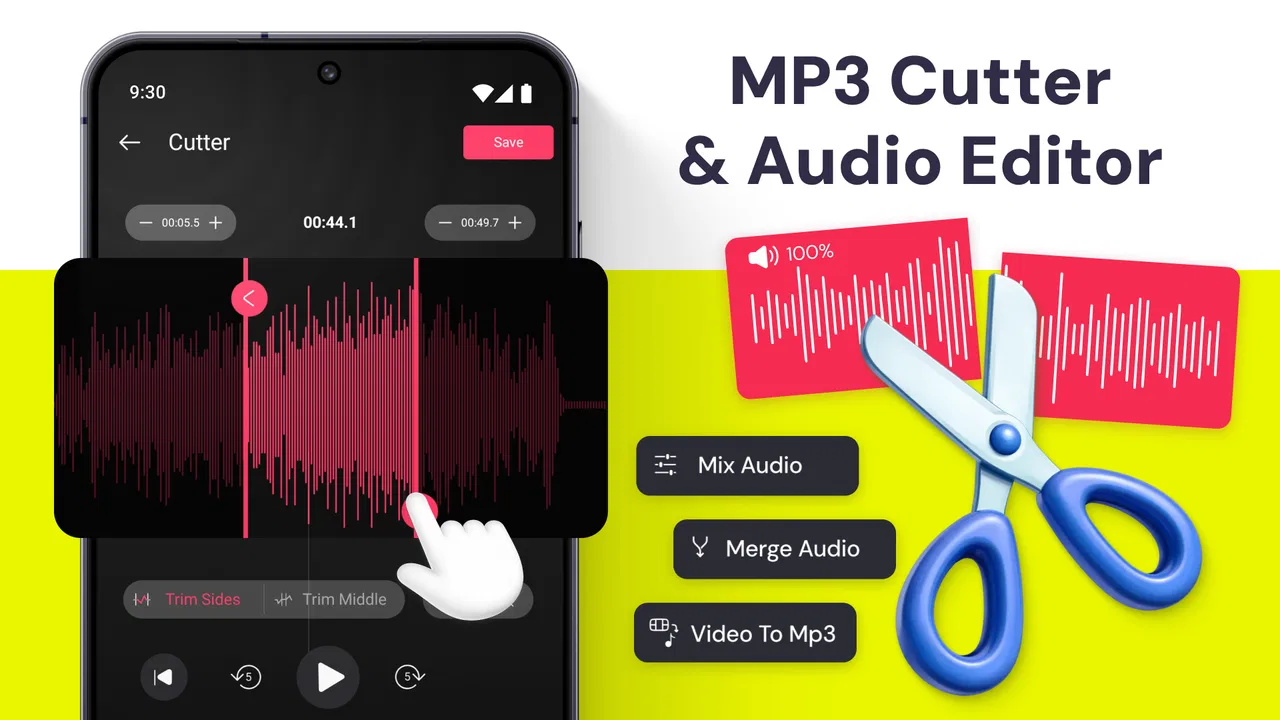
MP3 Cutter & Audio Editor
- 4.4
- Rating
- 1.00M
- Installs
- Free
- Price

 Analysis by App-foxy
I approached MP3 Cutter & Audio Editor as a practical music and audio tool rather than a full recording studio. Its purpose is straightforward: help me trim, cut, and adjust audio without making me learn a complicated production workflow. That focus is useful when I have a long file and need a shorter section quickly, but it also sets the right expectation. This is an editor for everyday audio jobs, not a replacement for a complete desktop workstation.
The app comes from Bizcraft Apps and is free to install, with optional in-app purchases ranging from $0.99 to $99.99 per item. It is rated for Everyone, works from Android 7.0 onward, and the current release is version 2.0. The published release date is May 9, 2025. Those details matter because the app is accessible to a broad range of Android users, including people using older phones, while the purchase model means I would still check the screen carefully before confirming anything paid.
Its public reception gives it a reasonable starting point: the app holds a 4.4 average from around 37 thousand ratings and has passed one million installs. I would not treat those figures as proof that it suits every workflow, but they do suggest that the basic idea is easy for many people to understand. My own view is similarly measured: it is most appealing when speed and simplicity matter more than advanced control.
You May Also Like

 Blood Strike: 2.5 Anniversary
Blood Strike’s Loadouts Turn Every Drop Into a Tactical Gamble
A close look at Blood Strike’s custom loadouts: how fast access to signature weapons reshapes its battle royale rhythm, rewards preparation, and narrows the gap between fights.

 Pandora - Music & Podcasts
Pandora’s Music Is Easy to Start, but Harder to Recover
Pandora’s strength is its low-effort path from a seed to a station. Its weak spot is how much confidence it asks you to place in connection, setup, and quiet recovery.

 8 Ball Pool
 Is Built on Rivalries, Rematches, and Routine
A close look at the rivalries, rematches, shared routines, and unanswered safety questions that turn a quick pool match into a persistent mobile community.

 Samsung Music
’s Quiet Strength Is Playing What You Already Own
Its reach comes less from spectacle than from dependable access to a personal library. That simplicity is both the app’s strongest retention engine and its ceiling.

 AccuWeather: Weather Radar
AccuWeather Review: A Quick, Clear Forecast for Everyday Decisions
For everyday plans, the best forecast is the one you can understand quickly. AccuWeather makes rain timing, radar, and local conditions easy to act on, with a few trade-offs.

 Hill Climb Racing
Why Hill Climb Racing Still Turns Crashes Into One More Run
A tiny car, a bumpy hill and one more upgrade: Hill Climb Racing keeps resurfacing because its simple chaos makes every near-miss feel personal.
More From Our News Desk



How the editor fits into real audio work
I use this section to think beyond the cut itself: choosing a clear goal, keeping an untouched original, and checking the finished clip are habits that make a small edit dependable. Those routines matter most when the recording will be shared or reused, and they lead naturally to the practical choices I would settle before opening a file.
A useful tool for quick cuts
The clearest use case is removing unwanted material from an existing audio file. I can imagine using it to shorten a song for a personal clip, isolate a spoken passage, remove silence at the beginning of a recording, or prepare a smaller excerpt to share. In each case, the value is not creative complexity; it is the ability to make a focused change without opening a large desktop program.
That makes the app especially suitable for people who already have an audio file on their phone and know roughly what they want to keep. If I am preparing a short notification sound, creating a compact sample for a presentation, or trimming a voice recording before sending it, a dedicated cutter is more comfortable than trying to work around a general file manager. The task stays centered on the waveform and the selected section instead of being buried inside unrelated media tools.
I would recommend it first to casual editors, students, social-media users, and anyone who occasionally needs a clean audio excerpt. It can also be handy for a family recording where the important moment is surrounded by empty space. The workflow is easier to justify when the job is measured in seconds or minutes rather than an entire album or a multi-track project.
Where expectations need to stay realistic
The phrase “audio editor” can make people expect mixing, mastering, effects, noise restoration, or detailed automation. I would not choose this app on that assumption. Its strongest identity is cutting and basic editing, so a musician building a layered arrangement or a podcaster trying to repair difficult background noise would probably be better served by a more specialized workstation.
There is also a difference between making a file shorter and improving its sound. Cutting can remove an unwanted section, but it does not automatically make a muffled recording clear or balance uneven voices. That distinction is important for first-time users: if the original recording is poor, a simple edit may make it more convenient without making it sound professionally produced.
I also see a practical trade-off in using a phone. Mobile editing is convenient, but precise selection can be harder on a small screen than with a mouse and keyboard. For a quick start and end point, that is not a serious problem. For a very exact edit where a tiny timing difference matters, I would zoom in carefully and listen back before saving.
Trust starts with visible choices
Because this is a file-handling app, I pay attention to the moments when it asks me to choose an audio file, save an edited copy, or approve a purchase. Those are the points where a user should slow down rather than tap through automatically. I want to know which file I selected, where the result will be placed, and whether I am changing the original or creating a separate version.
I would also review Android’s permission prompts as they appear, granting only what is needed for the action I am trying to perform. The safest habit is to choose a file deliberately instead of giving broad access without reading the request. If the operating system offers a file picker, I prefer using that visible selection step because it keeps the source file and the editing action clear in my mind.
The app’s Everyone rating makes it approachable for general household use, but an age rating is not a substitute for personal checking. Parents, shared-device users, and anyone working with private recordings should still look at the permission dialog and the app’s privacy information on the device or store page before importing sensitive material. I would not assume that a simple interface automatically means every audio file is appropriate to process casually.
Handling private recordings carefully
Audio files can contain more personal information than people realize. A voice memo may include names, addresses, medical details, or a conversation recorded in the background. Before opening a file in any editor, I would ask whether I really need to process the complete recording and whether a shorter working copy would be safer.
My preferred workflow is to duplicate an important original first, then edit the copy. This protects me from accidentally losing the unedited version and makes the result easier to identify later. I would give the output a clear filename instead of relying on a vague default, especially if several versions of the same recording are stored on the phone.
I would also avoid importing confidential audio merely to test the interface. A harmless sample file is enough to learn how selection and saving work. Once I understand the controls, I can decide whether the app is appropriate for a more private project. That small separation between testing and real material is one of the most useful trust habits for any mobile editor.
Sharing is another point where care matters. After editing, I would listen to the complete output and check its name before sending it through a messaging or social app. A trimmed clip can still contain more conversation than intended if the selection was slightly too wide. The editor may make cutting easier, but the final responsibility for what leaves the phone remains with me.
Practical control during an editing session
I find the best way to use a cutter is to define the purpose before touching the controls. If I want a ringtone-like excerpt, I decide the exact moment that should begin and end. If I am cleaning a voice memo, I identify the unwanted opening or closing section first. This prevents random dragging and makes it easier to judge whether the result actually solves the problem.
For a spoken recording, I would listen once without editing, note the approximate location of the useful passage, and then make the selection. After saving, I would replay the beginning and end rather than assuming the visual boundary is perfect. Speech can start softly or finish with a breath, so a technically short cut may sound abrupt even when the waveform looks tidy.
Music needs a slightly different approach. I would try to place the start and end at musically natural points, preferably where the rhythm or phrase supports the cut. A technically accurate selection can still sound awkward if it begins halfway through a beat. This is a good example of a trade-off that a store summary cannot explain: the app can help me choose a section, but my ears still have to approve the transition.
When the selected material is important, I would save a first attempt, listen on headphones, and only then decide whether another cut is needed. Headphones reveal small clicks and abrupt endings more clearly than a phone speaker. Keeping the first result also gives me a fallback if a second edit removes too much.
What makes it different from usual alternatives
The usual alternative is a full desktop audio editor. That option offers more room, deeper controls, and better precision, but it also takes longer to open and learn. For a one-off trim on a phone, that extra power can feel unnecessary. This app’s appeal is the opposite: it keeps the job close to the file and the immediate result.
Another alternative is a general video editor. Those apps can often cut audio as part of a video project, but they may encourage me to create a visual timeline even when I only need an audio file. A dedicated cutter is a cleaner choice when the output is audio alone. I would choose the video route only if the sound is already tied to a video or needs to be synchronized with visual material.
Built-in music players and file managers are useful for listening and organizing, but they are not always designed around editing. They may let me share a file or set it as a favorite without helping me create a precise excerpt. That is where this app has a clear role. It occupies the space between passive playback and advanced production.
On the other hand, a serious audio editor is the better choice for multi-track projects, detailed restoration, complex fades, or repeatable professional work. I would also look elsewhere if I needed a broad collection of specialized processing tools rather than a focused cutter. The right decision depends less on the app’s rating and more on whether the task is simple enough for a streamlined mobile workflow.
Questions I would settle before relying on it
A common concern is whether the app is suitable for an older Android phone. Since it supports Android 7.0 and later, it is not limited to recent devices. Still, compatibility does not guarantee identical comfort on every screen size or hardware configuration. I would test it with a nonessential file first, particularly on a phone with limited storage or a slower interface.
Another question is whether it is genuinely free. The app can be installed without an upfront price, but optional purchases are part of the experience, with individual items listed from $0.99 to $99.99. I would read each purchase screen, confirm whether an item is one-time or recurring if that information is shown there, and use device purchase controls to prevent accidental taps on a shared phone.
Users may also wonder whether it is appropriate for children. The Everyone rating indicates broad content suitability, but children may still need guidance when selecting files, granting permissions, or confirming purchases. On a family device, I would keep purchase authentication enabled and explain that an audio file can contain private conversations even if the editing task looks harmless.
For professional work, my answer is more cautious. I would use it for a quick preparation step, such as making a short reference clip, but I would not make it my only tool for a demanding production. A desktop editor or a purpose-built recording suite gives me more control when timing, sound quality, and repeatability are critical.
A realistic everyday workflow
Imagine I record a short interview on my phone, but the first part contains room noise while the useful answer begins later. I would first make a copy of the recording, open the copy in the editor, identify the clean starting point, and cut away the unwanted opening. I would then check the ending for extra conversation, save the result with a descriptive name, and listen through it before sharing.
If the result sounds too abrupt, I would reconsider the boundary rather than blaming the file. Moving the start slightly earlier may preserve the first word, while leaving a little natural space at the end can make the clip feel less harsh. This is where a simple cutter rewards patience: the controls may be easy, but a good result still comes from listening and making small adjustments.
For a personal music excerpt, I would follow the same pattern but pay closer attention to rhythm. I would keep the original untouched, make the selection, preview it with headphones, and save a clearly named copy. If the clip is intended for a particular app or device, I would also check that the exported file appears in the expected location before trying to use it elsewhere.
My cautious verdict
After weighing its purpose against the alternatives, I see MP3 Cutter & Audio Editor as a sensible choice for people who want a focused way to shorten or prepare audio on Android. Its free entry point, broad Android compatibility, and accessible Everyone rating make it easy to consider, while the strong average and large install base suggest that the basic concept resonates with many users.
The main strength is control over a small, clearly defined job. I can use a dedicated tool instead of opening a full production suite, and that saves time when I only need an excerpt or a cleaner beginning and ending. The most reliable results come from duplicating originals, checking permission prompts, naming outputs carefully, and listening to the finished file before sharing it.
My reservations are equally practical. I would not choose it for advanced sound design, serious restoration, or complex multi-track work. I would also treat private recordings cautiously, review every visible permission and purchase choice, and avoid assuming that a simple interface removes the need for backups. The optional purchase range deserves attention as well, particularly on a shared device.
For a friend asking whether to try it, I would say yes if the goal is quick audio trimming on an Android phone. I would suggest a more powerful alternative when precision, production depth, or privacy requirements demand a fuller workflow. Used within that boundary, this app is useful because it does not ask a small editing task to become a large project.
FAQs for MP3 Cutter & Audio Editor
01What can MP3 Cutter & Audio Editor do?
MP3 Cutter & Audio Editor is designed for basic audio editing on a mobile device. You can trim unwanted sections from songs or recordings, cut a selected part, merge audio clips, and create ringtones, alarms, or notification sounds. Depending on the version installed, it may also include format conversion, volume adjustment, audio recording, and simple fade-in or fade-out tools. It is mainly intended for quick edits rather than advanced studio production.
02Which audio formats are supported by MP3 Cutter & Audio Editor?
The application is primarily focused on MP3 files, but many versions also support commonly used formats such as WAV, AAC, M4A, and AMR. Support can vary according to the app version and your device, so it is worth checking the format list before downloading or importing a file. Export options may also differ, and some formats or higher-quality settings could be restricted by the device or premium features.
03Can I use MP3 Cutter & Audio Editor to make ringtones?
Yes, creating a custom ringtone is one of the most practical uses of MP3 Cutter & Audio Editor. After selecting a song or recording, you can mark the beginning and ending points, preview the result, and save the trimmed clip. On compatible devices, the app may let you assign the file directly as a ringtone, alarm, or notification sound. You may still need to change the final setting manually in your phone’s sound preferences.
04Does MP3 Cutter & Audio Editor work offline?
Most basic editing functions work without a continuous internet connection because the audio processing takes place on the device. This means you can generally trim or save locally stored files while offline. However, internet access may be requested for advertisements, analytics, cloud-related features, updates, or optional content. You should also make sure the audio file is already downloaded to your phone, since the app cannot edit music that is only available through a streaming service.
05Are there any privacy or permission concerns before installing it?
To edit audio, MP3 Cutter & Audio Editor normally requires permission to access music files and, if recording is supported, permission to use the microphone. These permissions are reasonable for the app’s main functions, but you should review the exact requests shown during installation because they may differ between Android and iOS versions. Avoid granting unrelated permissions, check the developer’s privacy policy, and remember that advertisements or third-party services may collect limited usage information.
Pros
- Supports many common audio formats for flexible editing.
- Simple trimming tools are suitable for quick edits by beginners.
- Can create ringtones
- alarms
- and notification sounds easily.
- Audio preview helps check cuts before saving the final file.
- Useful for extracting short clips from longer recordings.
Cons
- Some advanced editing features may require in-app purchases.
- Advertisements can interrupt the editing workflow.
- Large audio files may take longer to load or process.
- Export quality and format options may be limited.
- Requires storage and media permissions to access audio files.

MP3 Cutter & Audio Editor
Gallery